Your AI needs a company handbook.
Build a company knowledge base in GitHub. Give people and agents the context, instructions and checks to do useful work.
Imagine hiring a capable assistant, then making them guess what you sell, where the files live and which promises they’re allowed to make. A bold onboarding strategy.
AI agents need a proper first day, too. Give them the company’s current answers, working methods and a way to check the result. Their next task can start with context instead of another long explanation.
A company knowledge base gives those answers a home. Current service details, working instructions, decisions and checked results, organized so the next job starts further along.
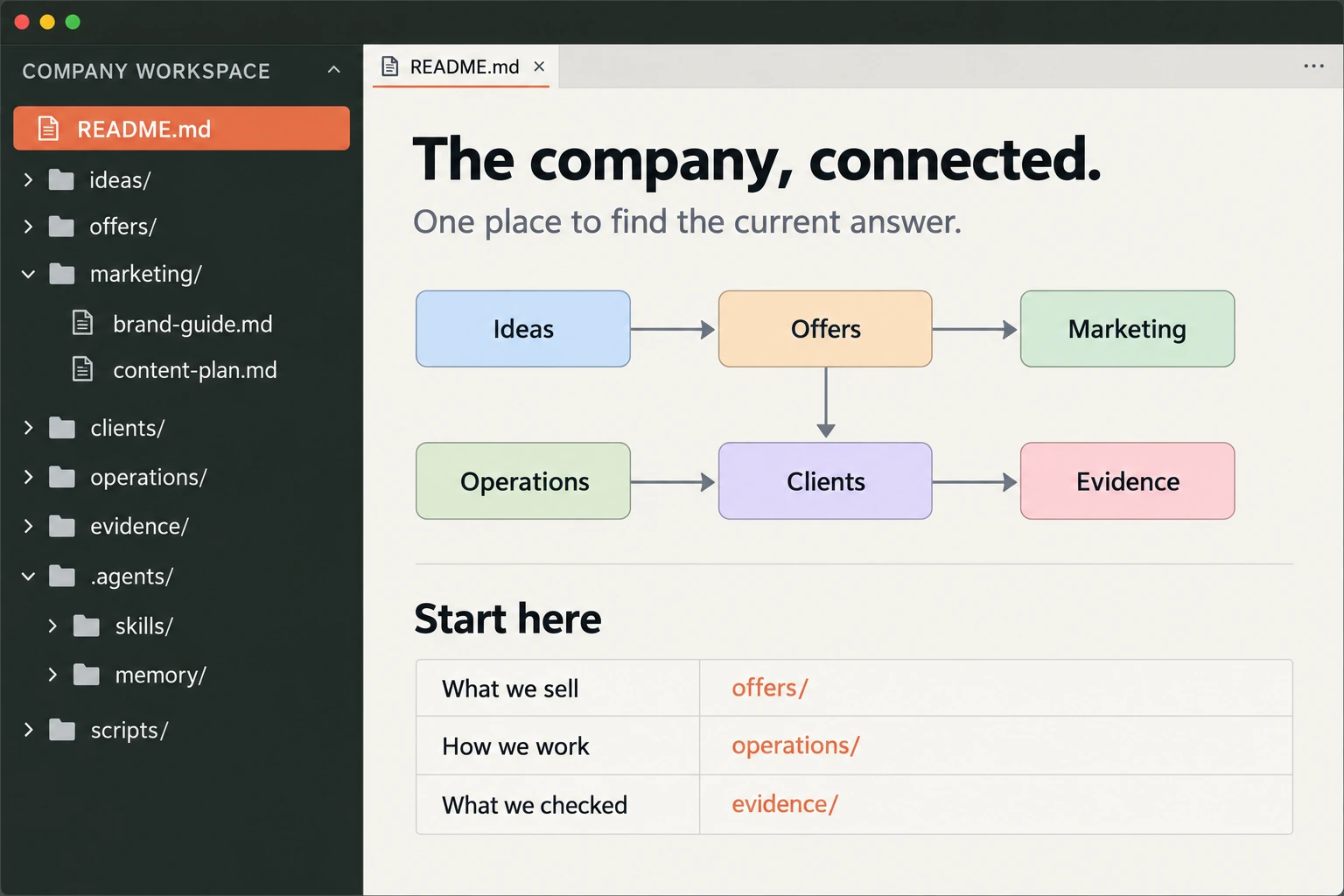
One foundation. Every service gets stronger.
A website needs accurate offers. A follow-up draft needs the right tone and next step. A report needs definitions everyone agrees on. An agent needs to know where its job ends.
These jobs all draw from the same business knowledge. Organize that foundation and each new workflow has somewhere useful to start.
An idea can link to an offer. The offer can link to the service page and delivery checklist. A client project can point to the approved scope; its reviewed result can inform the next version. The folders give each note a home. The links make the business navigable.
For a contractor, that might be service areas, estimate requirements and callback rules. For a shop, product guidance and returns. For a consultancy, project scopes and handoff checklists. Different businesses, same question: where’s the answer we trust?
We built our own company memory.
Fort Rock Media’s working knowledge base started as a business-idea notebook. As the work grew, we moved it into its own repository: frm-kb. It now holds our plans, offers, marketing research, delivery methods, operating notes and evidence.
We keep the public website in a separate repository. Reviewed ideas can become articles or service pages; the whole operating notebook doesn’t spill onto the internet. A separate local reading view makes selected notes easier to browse.
That’s dogfooding: using the approach on our own business while we work out what deserves to become a service. We can show the organization and checks. Customer time savings and commercial results still need measuring.
- 01
Knowledge
Offers, operations, research, delivery and evidence. Short folder indexes point to the current notes.
offers/ · operations/ · evidence/ - 02
Instructions
Rules for agents, plus focused skills for a particular job: what to read, what to do and when to stop.
AGENTS.md · .agents/skills/ - 03
Code & scripts
Small helpers check links or a built website. Product code stays in the project that owns it.
scripts/ · separate website repo - 04
Memory & maintenance
Dated receipts record checks and open questions. Migration records preserve where notes moved.
.agents/memory/ · health/
Give every part of the business a home.
Our folders follow the work. The names aren’t sacred; the useful part is knowing what belongs where, who keeps it current and which other notes it depends on.
- Strategy & ideas
strategy/records direction, decisions and alternatives. An idea starts as a question worth testing. Keep the reason behind a decision so the next person doesn’t have to rediscover it. A separateideas/folder is useful when there are enough ideas to need one.- Offers
offers/defines what customers can buy: the task, deliverables, scope and exclusions. Marketing and delivery should point to this answer instead of maintaining competing descriptions.- Marketing
marketing/holds positioning, brand guidance, content plans, search work and experiment preparation. It connects the customer’s problem to an actual offer. Research and checked results help decide what to say next.- Clients & delivery
clients/keeps permitted relationship and project context;delivery/holds reusable methods and acceptance checks. The agent can connect an approved scope to the right checklist. Sensitive customer records stay in the authorized system, with access limited to the people and tools that need them.- Operations & finance
operations/explains responsibilities, handoffs, account procedures and recurring work.finance/records costs and spending boundaries. These help an agent find the next owner and recognize when a proposed action needs a separate decision.- Research & tools
research/keeps sources, interpretations and questions.tools/records selected software, tested capabilities and unresolved limits. A vendor claim, our interpretation and an observed result deserve separate entries.- Evidence
evidence/records what was checked and what happened. A prepared campaign, a released page and a real customer inquiry are different events. Keep their receipts distinct.
That’s how the connections become useful. A marketing draft follows the approved offer. A delivery checklist follows the scope. A report follows the evidence. Change the source, then review the work that depends on it.
The front door, the rules and the voice.
Three small files help an agent get oriented before it does anything.
README.md- The front door. Explain what this repository is for, link to the current work and show where things live. Short folder-level indexes help people and agents find a specific answer without reading the whole company.
AGENTS.md- The operating rules. Explain how an agent should work in this project: which sources to trust, which checks to run, what belongs elsewhere and which actions require human review. It guides behavior; actual account permissions still control access.
VOICE.md- The writing guide. Define tone, vocabulary, audience and useful examples. The same facts might become a warm customer explanation, a precise operating note or a concise service page. A voice guide helps those drafts sound like they belong to the same company.
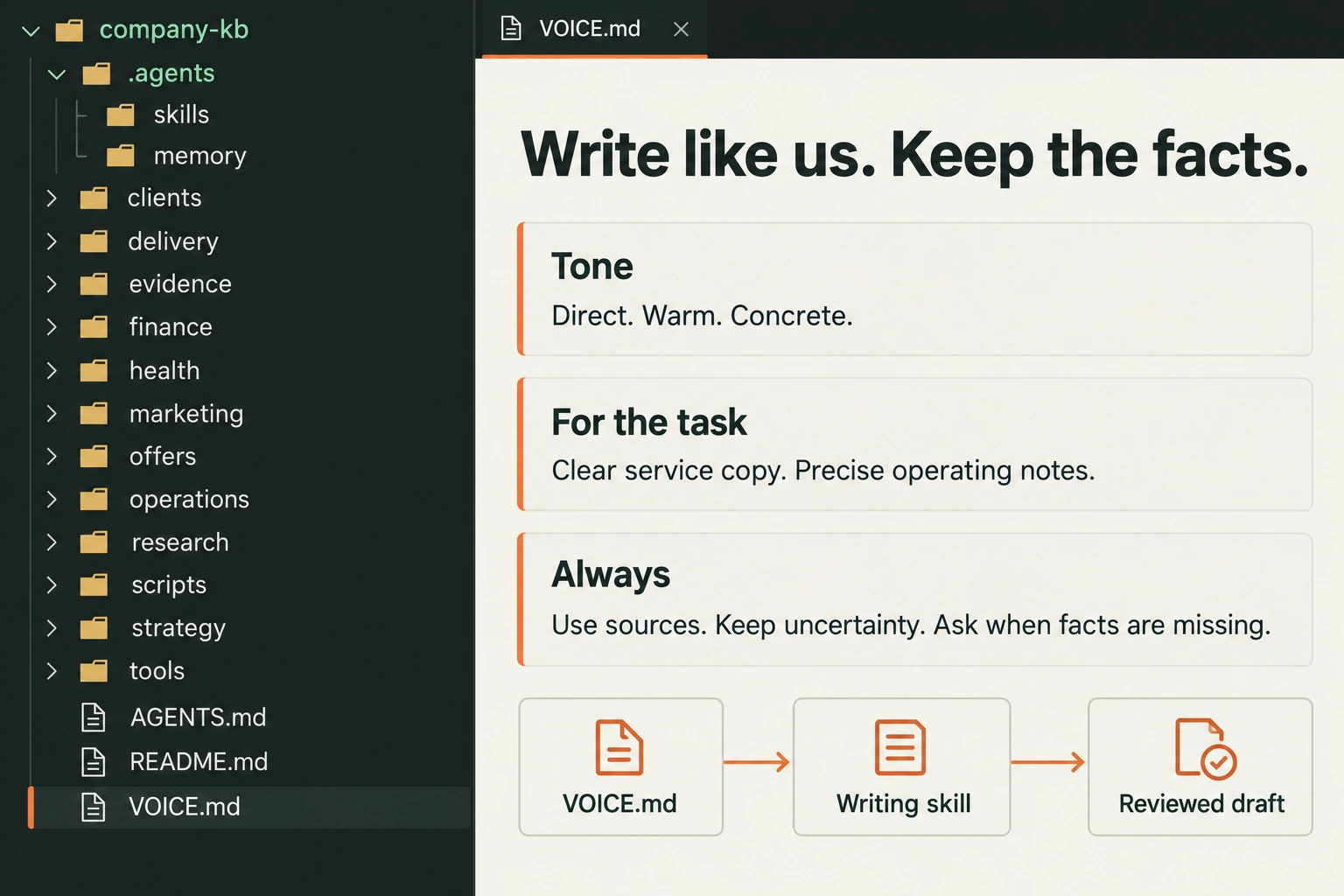
Voice matters because a factually correct draft can still feel wrong. Too stiff. Too vague. Too eager to announce that the future has arrived, when the customer just wants to know what happens after they request a quote.
In our setup, a focused writing skill tells the agent to find the relevant voice guide and apply it to the task. The guide holds the preferences; the skill explains how to use them. The public site receives reviewed copy, not the private guide.
A voice guide shapes expression. It doesn’t supply missing facts. It shouldn’t turn “we haven’t checked that yet” into a confident sales promise, invent experience or make every piece sound like a founder’s personal essay.
A handbook you can improve together.
Because the instructions can change alongside the documents and small tools they depend on. Git records committed versions. GitHub gives the team a place to propose a change, compare it with the previous version and review it before accepting it.
In plain English: “Here’s what I changed. Here’s why. Does this look right?” That’s useful for a quote policy as well as code.
Do we all have to learn Git?
Your delivery team needs to understand the versioning and review process. Everyone else needs a usable way to read, request corrections and approve relevant changes. A reading interface can sit over the same files; we don’t need a second copy of the company’s truth.
We’d start with a private repository and agreed access. Passwords, raw customer exports and sensitive records stay in their authorized systems. Links and approved summaries can provide context without copying everything.
GitHub documents repositories and visibility and proposed changes through pull requests. Access and review settings are part of setup; storing files alone doesn’t enforce a process.
Good agents need good context.
A good teammate knows the business, follows the process, asks when something is missing and leaves the next person a usable handoff. That’s the behavior we want from an agent, too.
Give it four things: context about the job, skills for doing it, boundaries around what it may decide, and checks that show whether the result is ready. Then test it on work you can actually review.
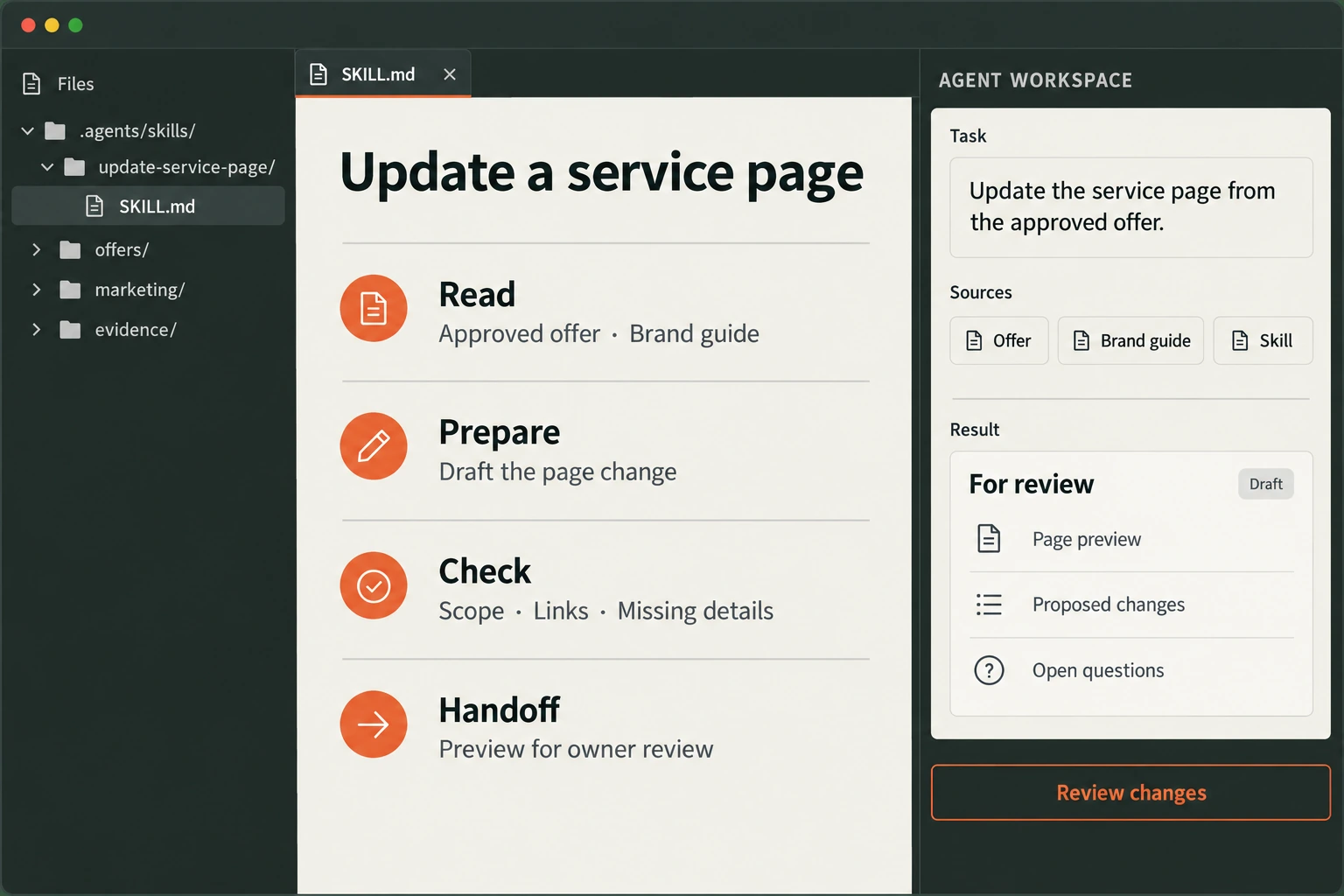
Uploading a mountain of documents doesn’t tell an agent which policy is current. A useful skill points it to the relevant sources, defines the output and names the checks. The skill is the job brief: sources, steps, checks and handoff.
Our skills cover focused work such as website readiness, inquiry intake, experiment preparation and workflow evaluation. They link back to the operating notes. A skill is an instruction pack; it doesn’t grant access to an account or make an integration work by itself.
Skills turn the handbook into repeatable jobs.
Each folder under .agents/skills/ contains a SKILL.md: when to use it, the sources to read, the work to do, the result to deliver and the conditions for stopping or escalating. Longer references and small helpers can sit beside it, ready when the task needs them.
For us, that includes an offer-evidence skill for grounding sales copy, an inbound-intake skill for defining the screening and handoff rules, a workflow-pilot skill for testing one process, and a dogfood skill for checking our own website and recording the result. Platform-specific skills cover narrower preparation and account work. Writing has its own voice skill.
These are instruction packs and documented methods. Each workflow still needs working tools, authorized access and tests appropriate to the job. Discovering a skill is a useful start; it doesn’t establish that the whole service works.
- Ask“Update the service page from the approved offer.”
- ReadCurrent scope, voice and publishing rules.
- Prepare & checkDraft the change. Check the page and links.
- Review & recordA person approves release. Save what changed and what passed.
In our own setup, a Python script checks local Markdown links. A separate site audit checks routes, metadata and referenced assets. These catch specific mistakes. They don’t decide whether an offer is good or whether a customer wants it.
Remember the decision. Check the machinery.
- Working memory
.agents/memory/holds dated receipts and a current index: what changed, what passed, what’s unresolved and who acts next. It helps the next session resume without pretending every old chat is current policy.- Scripts & code
scripts/holds small repeatable helpers, such as our link checker. A skill can tell the agent when to run a check; the script performs that check. The website’s own build code and assets live in the separate site repository.- Health & archive
health/records structural maintenance and migrations, so moved notes stay traceable.archive/preserves historical material without making it the current instruction. Both help a growing notebook stay navigable.
The files can be plain text. Markdown is text with lightweight headings, lists and links; a normal editor can open it. Git records the versions you commit. GitHub makes those committed versions available to authorized collaborators. Local drafts still need review and an intentional commit and push.
What keeps the knowledge useful over time?
Give important notes an owner, a status and a review date. Keep current decisions easy to find, with dated receipts underneath. Check links after moving files. Record alternatives when a decision needs context. Start an agent on the relevant index and skill, rather than asking it to absorb every file.
Retrieval also needs testing. Pick real questions, find the expected source and check whether the person or agent reaches it. “It’s in the repository” and “we can reliably find it” are different milestones.
Build the first useful shelf.
We’d begin with one repeated task and a small set of trusted documents. Sort out the current answer, build the instructions, test an ordinary case and an awkward one, then hand it to the person who’ll use it.
The deliverable is a company-owned operating pack: an organized repository, a reading path, one tested skill or workflow, useful checks, and a maintenance guide. Wider document migration, access integrations and ongoing upkeep need their own agreed scope.
You don’t need an elaborate library on day one. You need the next person—or robot—to stop guessing where the instructions went.